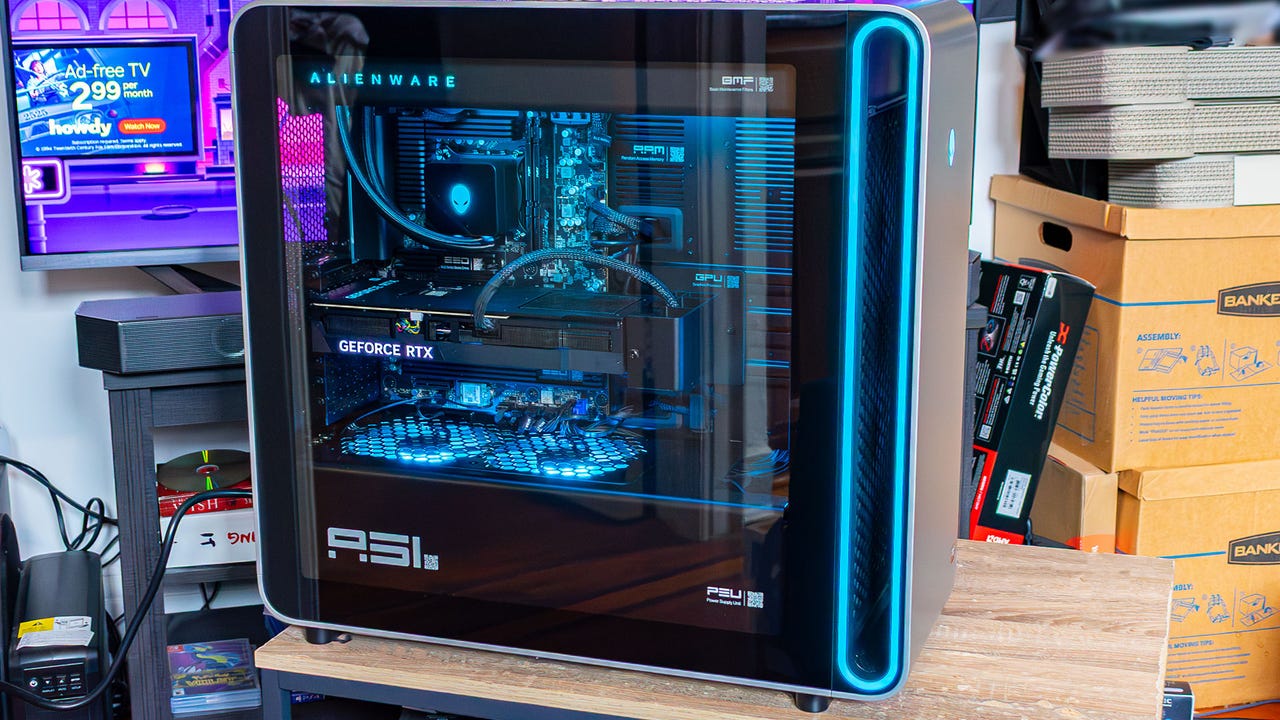
Twenty-five years ago, Alienware was basically synonymous with “gaming PCs.” It was really the only company that was making high-end gaming PCs and basically created the kind of RGB-heavy aesthetic that we all know and love (or hate) today. A lot has changed since then, and now that there are dozens of companies out there making high-end gaming towers, Alienware PCs seem a little less out of this world than they used to.
That’s kind of the medal Alienware wants to win back with the Area-51 – a name that evokes the company’s wild past. This new Area-51 tower is certainly more adventurous than some of the conservative designs the company has had in the last few years, and it’s packed with some of the most powerful hardware you can buy right now. But I can’t shake the feeling that this thing was designed in a boardroom to look cool in a post-Jony Ive world.
Design and Build Quality
The new Alienware Area-51 is huge. It’s nearly as tall as my desk, and weighs enough that I was seriously considering hiring someone to carry it up to my third-floor walkup (luckily, I managed). This giant tower measures 22.4 inches tall, 24 inches deep, and 9 inches wide, and can weigh up to 76lbs. I didn’t weigh the unit Alienware sent me, but it was probably close to that max weight.
A lot of that weight is due to the materials. This is a mostly metal PC case with a giant glass side panel and a mechanical system that lets you twist a little dial to unlock the PC, followed by buttons on either side that’ll open it up, rather than arguing with some thumbscrews like a normal PC. This is in service of making upgrades to the system toolless, but that locking dial is secured by a Philips-head screw, so you’re still going to have to break out some tools to open the PC. At least the first time.
I will admit, though, that popping open this PC to get the little foam insert that secures the graphics card for shipping was immensely satisfying, even if I was a little confused about how to get into the system for a few seconds. You simply get rid of the retaining screw, twist the locking dial, and then push one of the buttons on either side to gracefully pop open the glass side panel or the back panel, giving you access to the innards. That’s awesome for anyone that likes to tinker with their system, or even just to clean the thing.
Once you’re inside, Alienware has included little QR codes for pretty much every component, which, when scanned, will lead you to a guide on how to swap out that part. Given that a lot of the people who are going to buy a PC like this probably aren’t familiar with building their own PC, this is a great way to demystify the system.
The top of the chassis has ventilation holes drilled into the case itself in a cool honeycomb-esque design. On the opposite side of these holes is the radiator, which, in the entry-level model I reviewed, hosts a 360mm AIO. There are plenty of other fans on offer too, with two 120mm fans mounted above the power supply and two 240mm fans on the front of the case, all serving as intake.
In front of the ventilation are the front ports. You get two USB-A and two USB-C, along with two 3.5mm audio jacks, one for headphones and the other for a microphone. Of course, because this is a giant gaming PC with a full-sized motherboard, there are also a wealth of ports around the back, so you should have no problem plugging in all your peripherals and devices.
Unlike a lot of traditional PC cases, the front case fans are hidden behind a weird alcove in the front of the PC. This is surrounded by an RGB lighting strip, and it looks cool, but really, it serves the purpose of not letting the metal front panel impede airflow too much. That front panel does look cool, though, with the only decoration being an RGB Alienware logo that doubles as a power button.
Of course, it’s not just the power button and the weird oval-shaped alcove that’s bedecked in RGB lighting. Alienware has strapped rainbow lighting to the fans, the graphics card, and the CPU block as well. Out of the box, these have a nice blue-ish color to them that can’t stop reminding me of Glacier Freeze Gatorade. You can change this in the Alienware Control Center, but the default lighting profile is pretty sweet.

Software and Features
Because Alienware is owned by Dell, the Area-51 comes with some level of pre-installed software that you’re just going to have to make peace with or uninstall on day one. However, they’re not the most bloat-y I’ve seen in a mainstream prebuilt like this.
The Alienware Command Center is quite flashy, but it’s simply there to help you manage performance profiles and lighting configurations. However, this app does throw up notifications constantly, so I’d advise muting them and just manually checking in occasionally to see if there are any updates. This software does also give you access to some library management tools and Alienware Arena, but as long as you have Steam or GOG Galaxy, it’s pretty safe to just pretend these features don’t exist – they’re not very good.
This gaming PC also comes with a RAID configuration tool by default, even though the model I reviewed only came with a single SSD. That’s a nice utility to have, but for most people who are buying an Alienware PC are probably best served by ignoring this or just uninstalling it. Luckily, it does give you a little warning when you open it that it could break shit.
Beyond that, there’s the standard Dell suite of update tools and support programs. These don’t run in the background or anything, so they’re safe to just leave alone. They’re there if you need them.
Performance and Gaming
Alienware sent me an Area-51 with an RTX 5080, 32GB of RAM, and a Ryzen 7 9800X3D, so it’s little surprise that this thing rips. This is absolutely the kind of gaming PC that can play any game on the market at 4K with cranked settings and still clear 60 fps, especially when frame generation and DLSS upscaling are thrown into the equation.
In 3DMark, the Alienware Area-51 performs just as I’d expect out of a rig with an RTX 5080, getting 9,080 points in Speed Way and 8,685 in Steel Nomad. This is actually a little better than what I got out of the Founders Edition when I reviewed it last year, but it’s still within the margin of error.
I tested Black Ops 7 at 4K with the extreme preset, with DLSS set to ‘performance’ and ray tracing disabled, and I was able to get a solid 145 fps. Then, in Cyberpunk, with the Ray Tracing Ultra preset at the same resolution, the Area-51 scored an 88fps average. From there, you can enable frame generation if you have a high-refresh display, which upped the frame rate to 143 and 247 fps for 2x and 4x FG, respectively.
The only game where the Area-51 struggled even a little bit was in Metro Exodus. Here at IGN, we test this game with RT enabled, but with no upscaling, because it only supports DLSS. But even at a native 4K, this Alienware machine was able to squeak by with a 62 fps average at 4K.
Pretty much no matter how you spec it out, the Area-51 is going to be powerful enough to run most AAA games with maxed out settings for a few years. And, even once the RTX 5080 starts to show its age, it’s easy enough to upgrade this system that you won’t feel like you need to go out and spend another $3-4,000. Hell, this machine has enough overhead for creative workloads too, which might help soften the financial blow a bit.
Jackie Thomas is the Hardware and Buying Guides Editor at IGN and the PC components queen. You can follow her @Jackiecobra